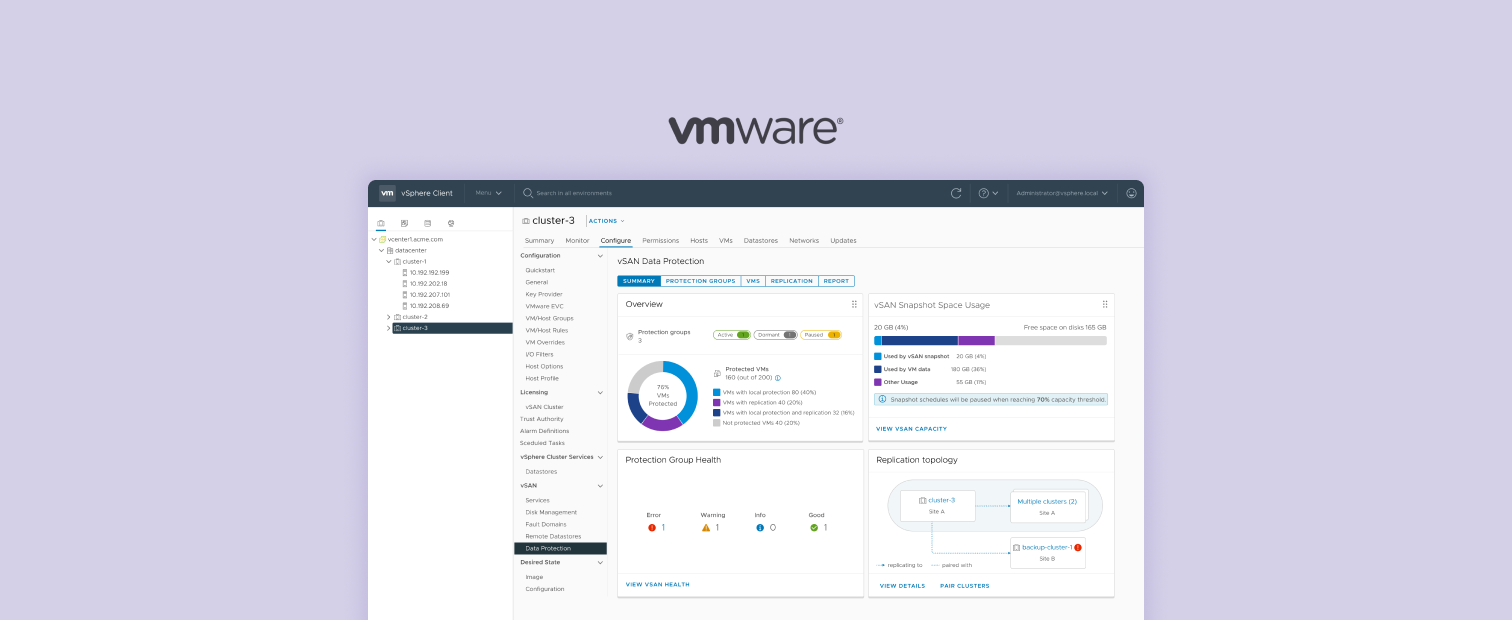
vSAN Data Protection dashboard

VMware · vSphere 8.0u3 → VMware Cloud Foundation 9.0 → 9.1

vSAN Data Protection

I designed vSAN Data Protection from zero — a 3-year project covering snapshot management, cross-datacenter replication, and a monitoring dashboard for infra admins managing hundreds of VMs across production datacenters.

Role
Sole Product Designer — 0 to 1
Timeline
2023 – Present · 3 releases
Team
PM · Eng Architects · UI Engineers · Product Marketing Team
Research
Moderated sessions · 70+ unmoderated responses · demo feedback
Platform
vSphere Client · VMware Cloud Foundation
Users
Infrastructure Admins managing hundreds of workloads

Background & Problem

Imagine a bank losing every transaction record from the last 24 hours. Or a hospital unable to access patient records during an emergency. For enterprises, data loss isn't just an IT problem — it's a business crisis.

The Risk

Data protection had no home in the platform

vSphere had a snapshot feature. It had no scheduling, no automation, and no retention policy. For enterprises with real compliance requirements, it wasn't enough.

The Workaround

Third-party tools — necessary, but costly

Infrastructure admins keep the lights on. Hundreds of VMs, storage, networking — across multiple datacenters, often with a small team.

Most teams filled the gap with third-party backup tools. That meant procurement, deployment, and integration work — before a single VM was actually protected.

Frustrated infrastructure admin Infra Admin
Cost & Procurement
Justifying a new product purchase before a single workload is protected
Deployment
Installing and configuring a separate product into an already complex environment
Integration & Maintenance
Connecting it to existing workflows — and keeping it running alongside everything else
The Opportunity

Build it natively — where admins already work

vSAN made native VM protection technically feasible for the first time. The opportunity: give infra admins data protection built into the tools they were already using — no separate product, no extra setup.
My Role & Approach

I was the sole designer on vSAN Data Protection for 3+ years across three releases. The goal was to make a net-new capability feel like it had always belonged in vSphere — not like a plugin someone added. That meant working closely with engineering, PM, and field teams to find the things that never made it into a spec.

Org
Connecting the dots
Bridging engineers who rarely talked to the people running their software, and surfacing dynamics that shaped what was feasible.
Teams
Navigating alignment
Driving cross-functional decisions across vSphere and vSAN product and UX leads — competing priorities, shared outcomes.
Users
Finding the unasked questions
Sitting with admins long enough to surface what they hadn't said yet — the unknown unknowns where the real problems live.

Research methods

Moderated usability sessions, unmoderated UserZoom studies (70+ responses), customer feedback at industry stands, and regular field engineer interviews — direct access to users, not filtered through PM.

Releases

Phase 1 · vSphere 8.0u3
MVP: Local Protection for Fast Restore
Read release notes →
Phase 2 · VCF 9.0
Replication for Disaster and Cyber Recovery
Read release notes →
Phase 3 · VCF 9.1
Coming soon

End-to-End Journey

Here's the full flow — from first setup to active use. Click any step to see the UI.

Screenshot placeholder

Design Challenges

Building from scratch over three years meant running into a different kind of problem on every release — some were pure UX, some were org problems, and some were research fights worth having.

Challenge 01

Protection at Scale

With vSAN Protection Groups, admins stop chasing individual VMs and define rules instead — the system handles membership and scheduling. The problem: at scale, building those groups manually defeats the purpose. Two decisions made this actually work.

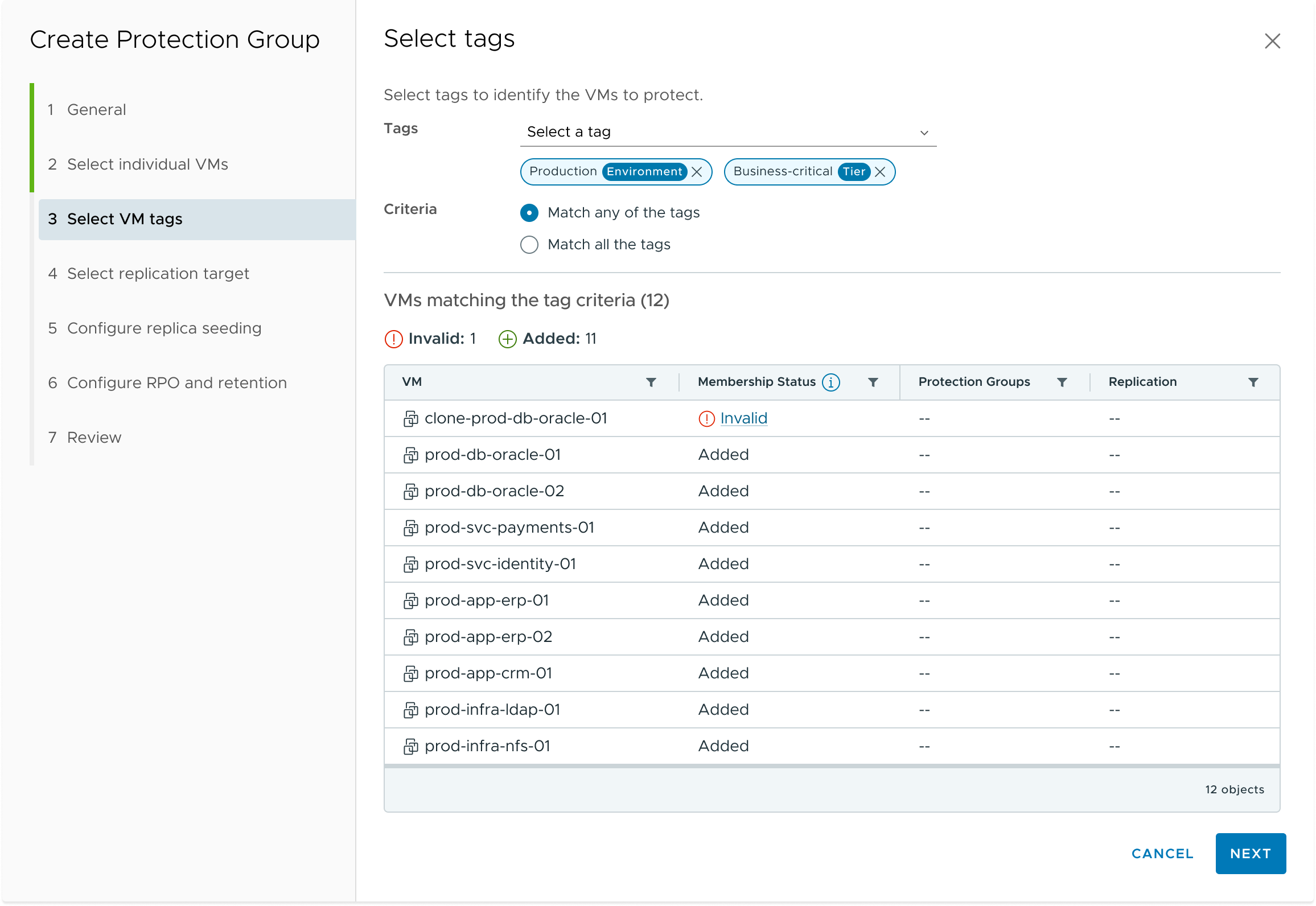
Infra admins already organize their VMs using tags in vCenter — grouping by environment, tier, or team. We leveraged this directly: admins define Protection Group membership by tag criteria, so any new VM matching the tag is automatically protected. No manual re-selection. No risk of forgetting to add a new VM.

Protection Group tag-based VM membership
Tag-based VM selection — matching VMs are automatically included in the Protection Group

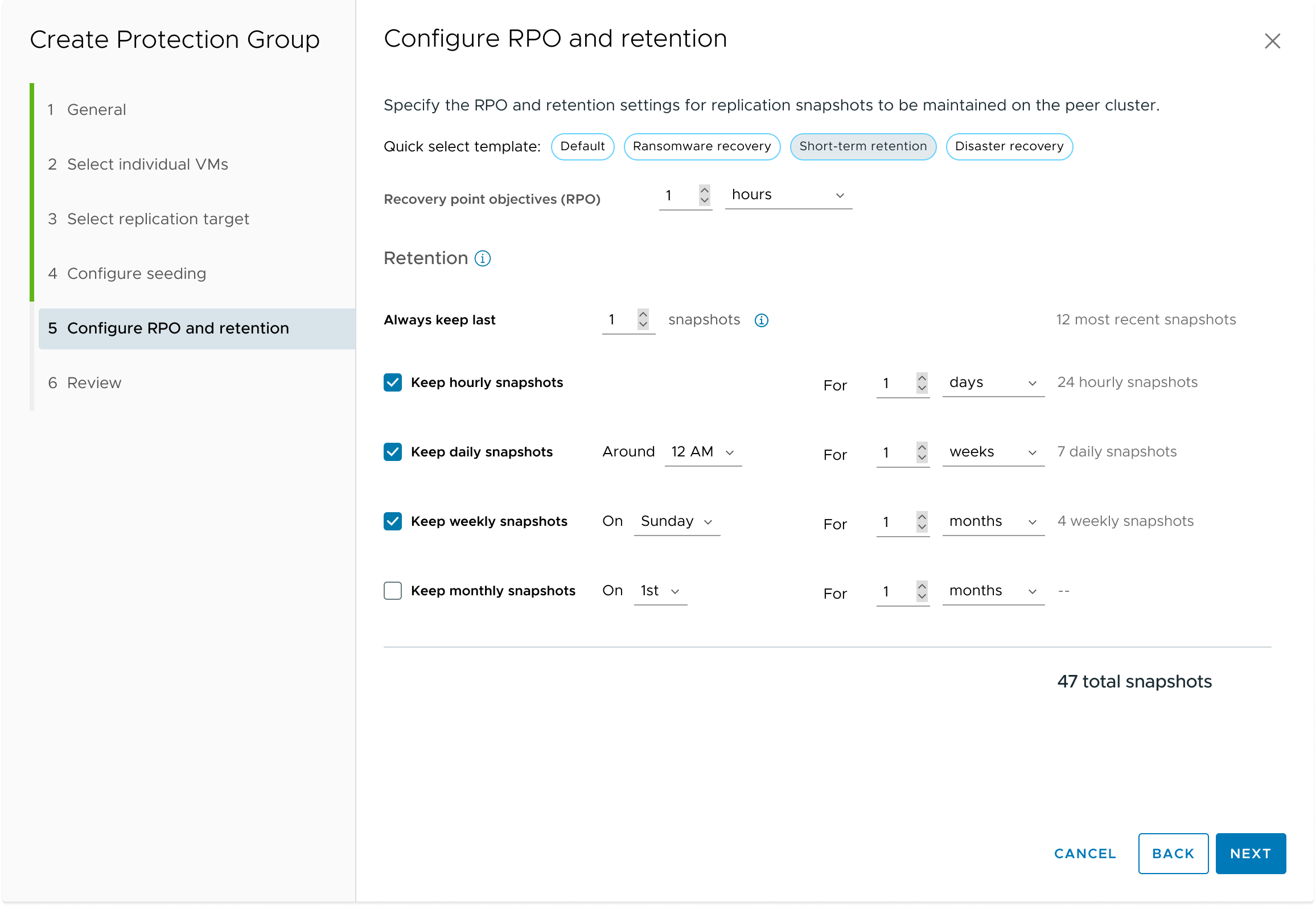
Configuring RPO and retention schedules is technically complex — and getting it wrong has real consequences. We introduced quick-select templates (Default, Ransomware recovery, Short-term retention, Disaster recovery) that pre-fill sensible settings based on common use cases. Admins can adopt a template as-is or fine-tune from a strong starting point.

RPO and retention configuration with quick-select templates
Quick-select templates make RPO and retention configuration approachable — without sacrificing flexibility
Challenge 02

The Mental Model Conflict

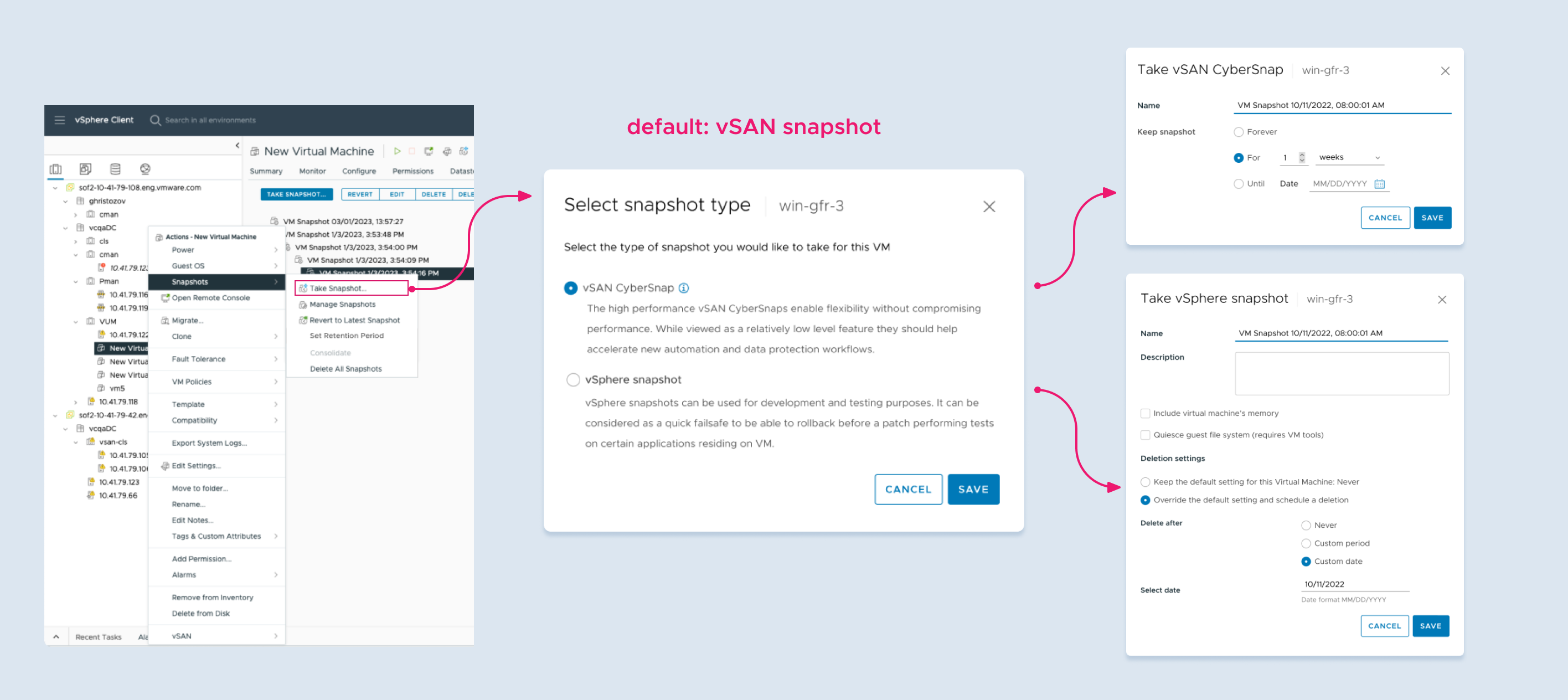
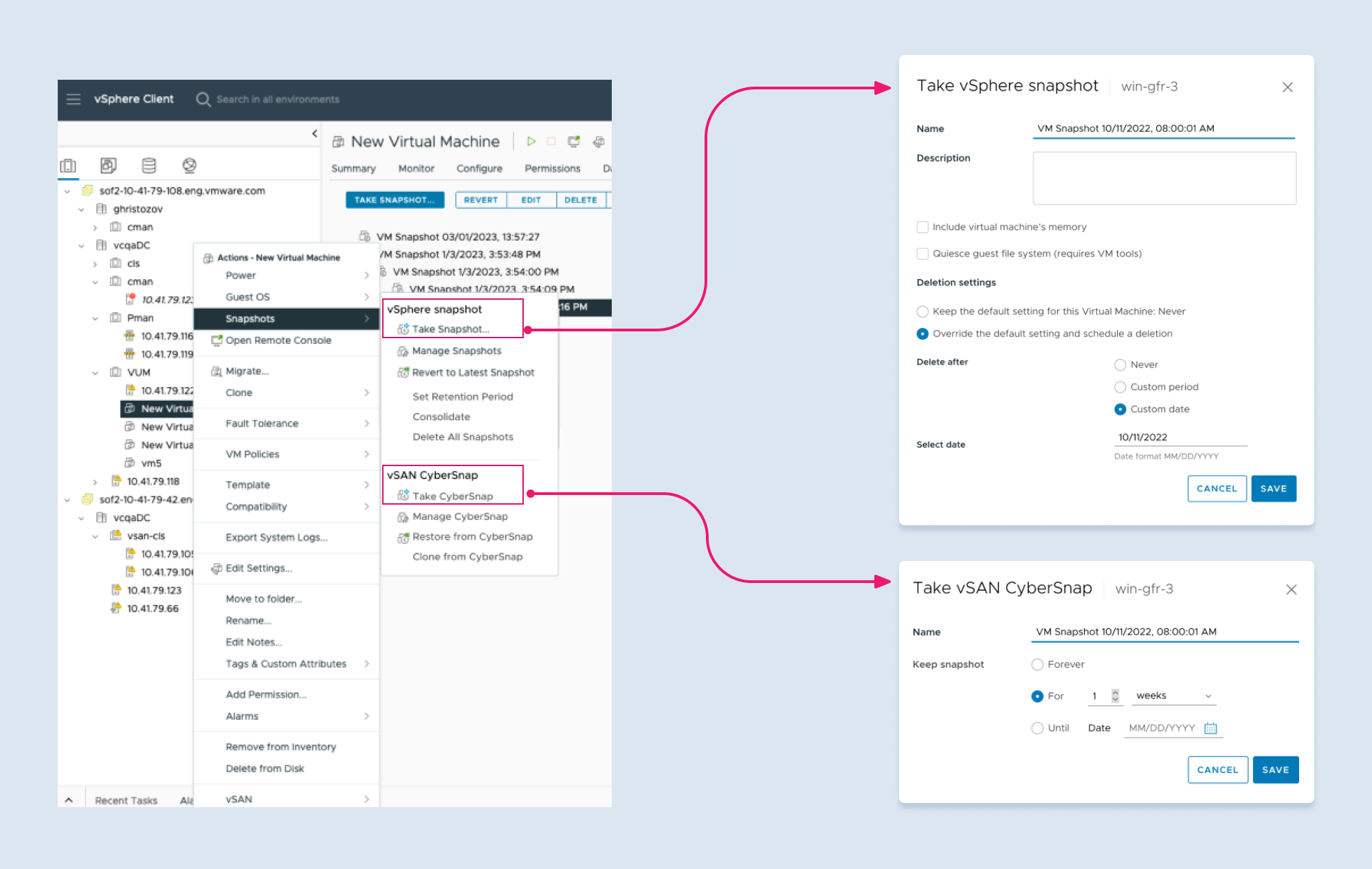
Engineering wanted to keep vSphere and vSAN snapshots completely separate — one legacy, one better. I disagreed. Users don't think about storage architecture. Research showed they saw vSAN snapshots as an extension of what they already knew, not something new to learn. I brought my manager in and we aligned vSphere and vSAN UX leads around one rule: same entry point, regardless of what's running underneath.

Same gesture, same context for both snapshot types. More intuitive, lower cognitive load. Ideal for users but technically complex to unify given separate appliance architecture.

Unified snapshot type selection — single entry point with type chooser
Single "Take Snapshot" entry point prompts users to choose the type

Separate paths, but vSAN snapshot actions surface in the same places users already look. More scalable for vSAN-specific operations and achievable within eng constraints.

vSAN CyberSnap actions surfaced in existing vSphere right-click context
vSAN CyberSnap actions appear alongside vSphere snapshot in existing menus

It was a compromise. But we got most of the consistency benefit without overpromising what engineering could actually ship.

Challenge 03

Challenging the Geo Topology

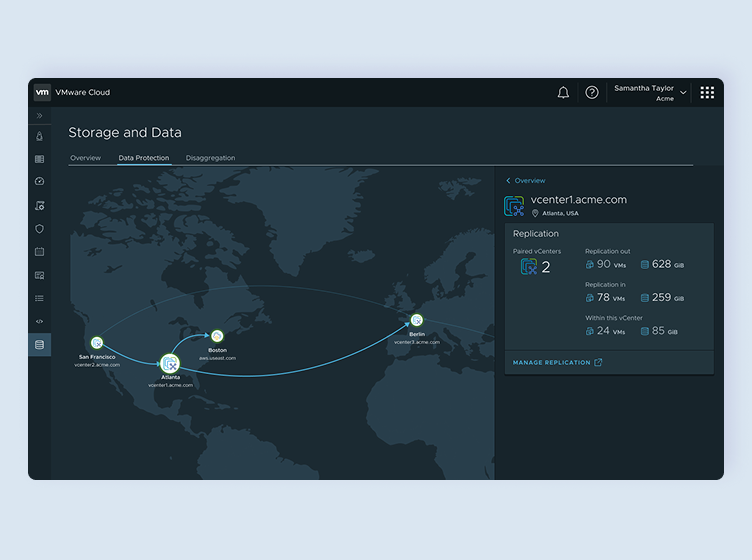
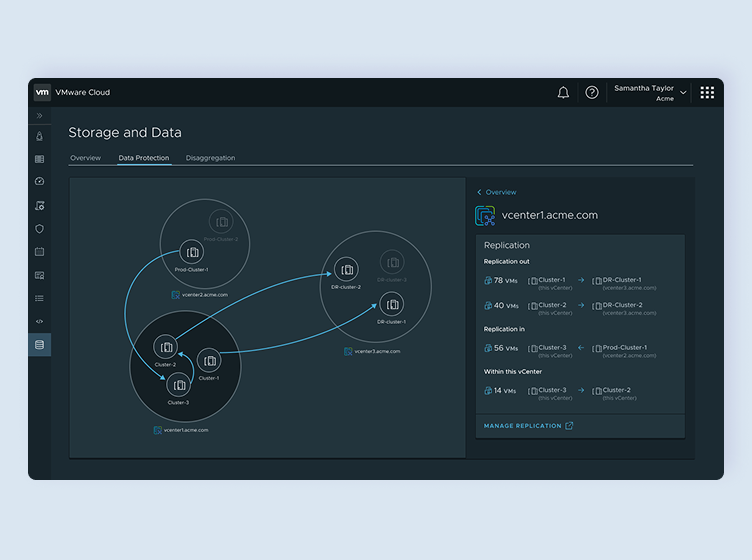
As part of VMware's push for a cloud-connected platform, a global data protection dashboard was a key highlight — giving admins cross-datacenter visibility in one place. Product leadership had strong momentum behind a geographic map: visually striking, great for demos and marketing. But prior UX research suggested geographic views offered limited operational value to admins who think in clusters and replication relationships, not physical coordinates.

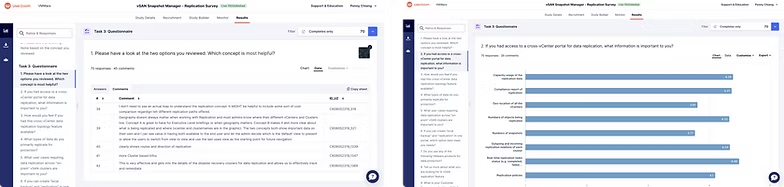
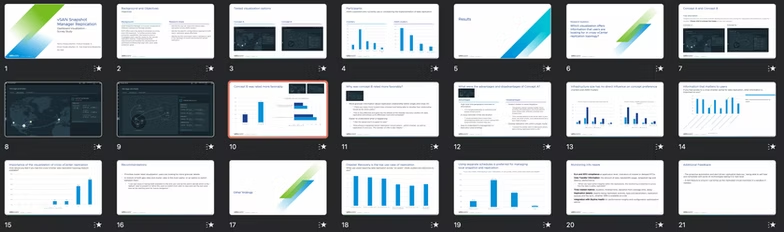
Rather than push back on instinct alone, I partnered with our user researcher to run an unmoderated concept test in UserZoom — comparing both approaches directly to let the data decide.

Option A — Geographic map view
Option B — Relational cluster view
Option B — Informed the cluster topology in vSphere Client
71%
Participants preferred the relational cluster view over the geographic map
70 valid responses collected within one week after iterating on the study design to reduce completion friction. Admins already had geographic locations internalized — what they needed was granular, actionable replication health data.
Behind the scene
Study results in UserZoom
Research shareout deck

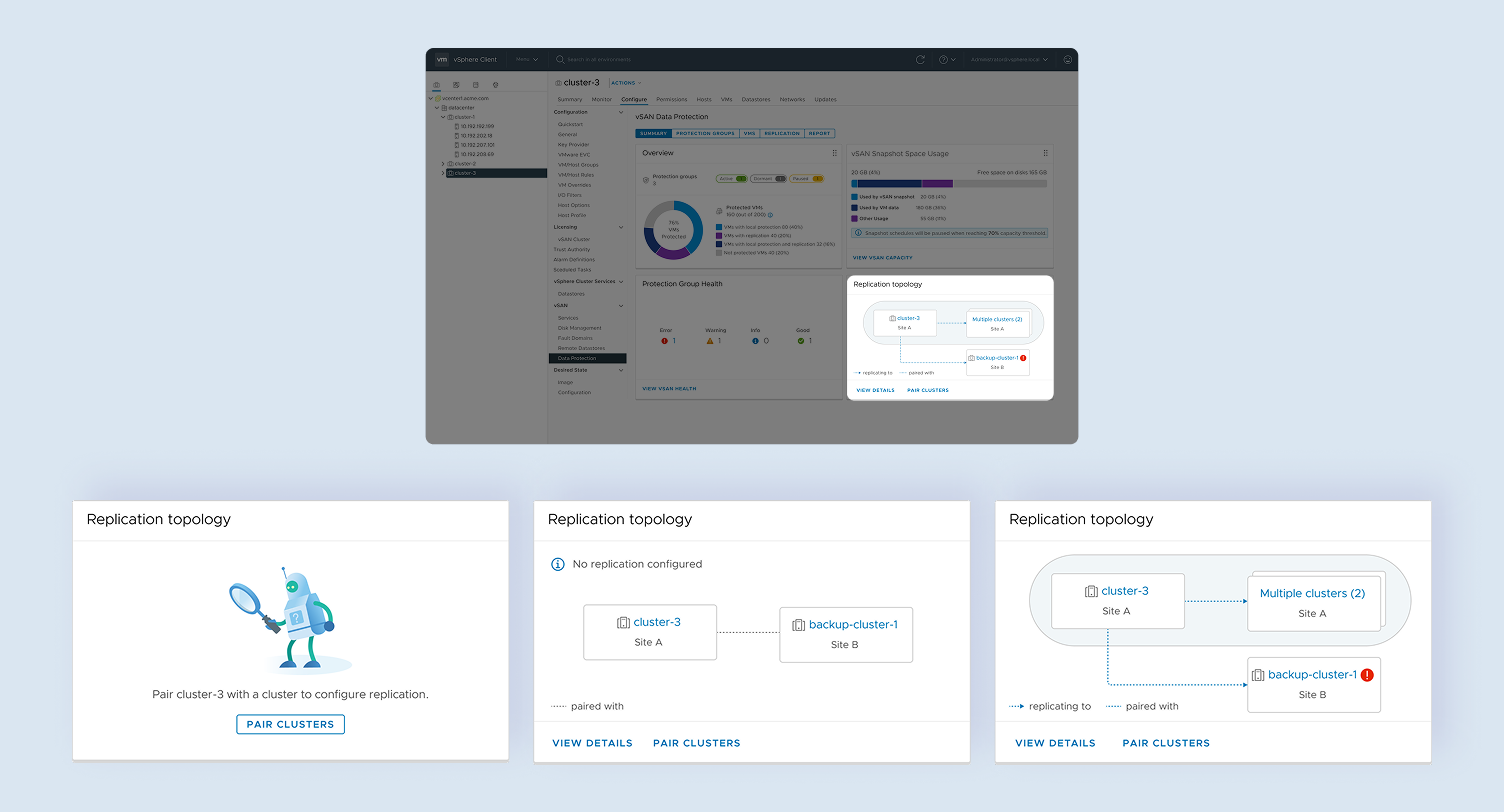
The data changed the direction. The geographic map was dropped. Instead, we shipped a cluster topology view with connectivity status inside vSphere Client — the kind of view admins were already thinking in.

Cluster replication topology on the cluster dashboard
Different statuses of cluster replication topology on the cluster dashboard
Challenge 04

Solving Discoverability After Launch

After 9.0 shipped, feedback was consistent: admins couldn't find the feature. The architecture is the problem — no appliance means no UI, so first-time users hit a blank page with no explanation. Engineering couldn't fix the underlying issue in 9.0. In 9.1, I turned that blank page into a step-by-step onboarding flow with pre-filled URLs, so admins could get set up without opening a single doc.

Select a step above

Outcomes & Reflection

vSAN Data Protection shipped as a native capability inside vSphere. No separate product to buy, no separate agent to deploy. Just protection inside the software admins were already running.

The community response matched what we heard in research. Practitioners called out how it fit into their existing workflows without extra overhead. As the product team put it: "a way to protect data that is easy to use, efficient, and integrated right into the software they already know."

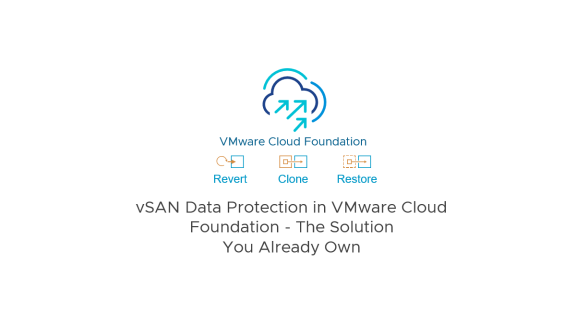
vSAN Data Protection in VMware Cloud Foundation — The Solution You Already Own
Phase 2 release — vSAN Data Protection in VMware Cloud Foundation

Looking back...

Designing this from scratch was the hardest and most rewarding thing I've done. Watching a rough Figma sketch become something infra admins actually rely on — that's the job.

None of this happened alone. My PM trusted my calls when the research was pointing somewhere unexpected. My manager and the broader UX team pushed back when I needed it and covered my blind spots. That kind of team is rare.

I came in curious and left with things that take time to build: domain depth, a sharper instinct for when research can shift a decision, and the confidence that comes from shipping something real. I'm ready for whatever comes next.

← Back to all work
Next Case Study
Cashback to Donation App →